Extract Tables from PDF to Excel
Upload PDF files containing tables and extract all data - headers, rows, columns, and values - into editable Excel spreadsheets with AI-powered OCR
0/25 daily conversions
Start free instantly • All document types • No signup required
Privacy First: Your images are never stored - processed instantly and discarded
Unlock the Data Vault 🔓
PDFs are where data goes to hide. Annual reports, SEC filings, research papers - all packed with tables you can't select, can't copy, can't analyze. Until now. Our AI reads through PDF layers, finds every table, and liberates your data into Excel where it belongs. Text-based or scanned, single page or hundred-page reports - we handle it all.
The PDF Problems We Solve
"Copy-Protected" Tables
PDF copy-paste gives you garbage? Our OCR reads the visual content, bypassing text layer restrictions.
Multi-Page Spanning Tables
Table starts on page 12, continues through page 15? We detect continuations and merge them correctly.
Scanned Document PDFs
Printed reports that were scanned back to PDF? No text layer? No problem - we read the image.
Complex Table Layouts
Merged cells, nested headers, footnotes inside tables - we preserve the structure, not just the text.
Who Relies On This
Financial Analysis
Extract earnings tables from quarterly reports. Pull pricing data from vendor PDFs. Build comparison models from competitor filings.
Research & Academia
Harvest data from published studies for meta-analysis. Extract statistical tables from journals without manual transcription.
Legal & Compliance
Convert contract exhibits into workable spreadsheets. Extract pricing schedules from regulatory filings.
Procurement
Turn supplier catalogs into comparable price lists. Extract product specifications from technical PDFs.
Batch Processing Power
Got 50 quarterly reports? 100 vendor catalogs? Upload them all. Each PDF processes independently, and you download Excel files as they complete.
PDF Extraction vs. Manual Retyping
Manual Method
- ✗Hours of typing per document
- ✗Inevitable transcription errors
- ✗Formatting lost completely
- ✗Doesn't scale beyond a few docs
ScanToExcel Method
- ✓Seconds per document
- ✓AI-verified accuracy
- ✓Structure preserved intact
- ✓Handles hundreds of files
What We Extract
- ●Tables with merged cells and nested headers
- ●Both text-based PDFs and scanned/image PDFs
- ●Financial statements, statistical tables, product catalogs
- ●Headers, rows, columns, and cell values preserved
See PDF Table Extraction in Action
From PDF to spreadsheet in seconds
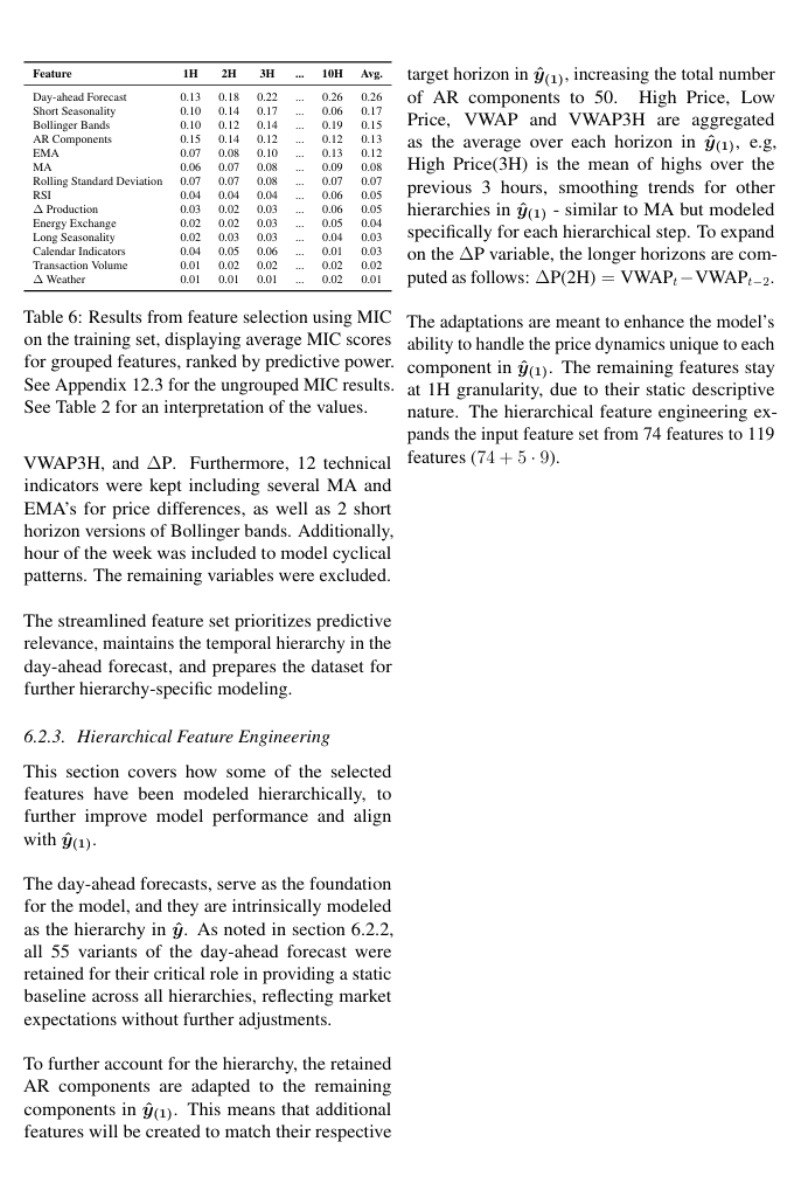
Upload PDF with tables
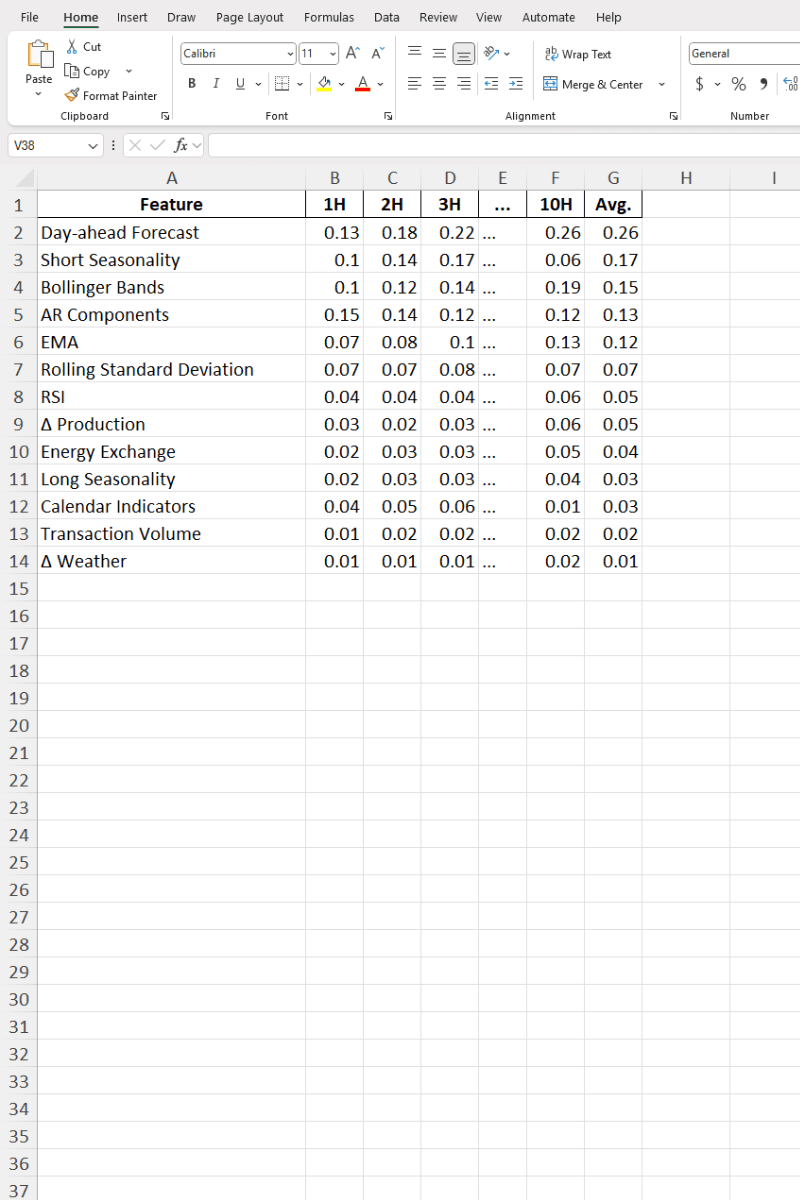
Get extracted Excel data
Choose Your Plan
Start free and upgrade when you need more power. All plans include all document types and export formats.
Free
Perfect for occasional use. No account needed.
- 10 conversions per day
- Receipts, invoices, bank & credit card statements, paystubs, table images
- Scanned PDFs, text PDFs, multi-page PDFs, JPG, PNG, HEIC, WebP & more
- Export to Excel, CSV, Word, PDF, XML, JSON
- Privacy first: files & output are never stored
Free+
Free forever
Double your daily limit with a free account.
- 20 conversions per day
- Everything in Free
Premium
Billed monthly
For power users who need maximum conversions.
- Unlimited conversions
- Enhanced AI model for better accuracy
- Priority processing
- Priority email support
- Everything in Free+
Other Document Conversion Tools
Receipt to Excel
Convert receipt photos to organized spreadsheets for expense tracking
Bank Statement to Excel
Extract transactions from bank statements for financial analysis
Invoice to Excel
Digitize invoices and bills for accounts payable management
Credit Card Statement to Excel
Convert credit card statements for expense categorization
Paystub to Excel
Extract paystub, paycheck, and payslip earnings and deductions
Image Table to Word
Extract image tables to Word documents
Image Table to Excel
Convert scanned tables and whiteboard photos to Excel
Camera Image to Excel
Snap photos with your phone and convert to Excel instantly
Documents to JSON
Convert financial documents to JSON for data science and APIs
Documents to XML
Convert to XML for ERP systems and enterprise integration
PDF Tables to Word
Extract PDF tables into editable Word documents