Extract Tables from PDF to Editable Text
Upload PDF files containing tables and extract all data into editable formats - paste directly into Word, Outlook emails, or any document editor
0/25 daily conversions used
Start free instantly • All document types • No signup required
Privacy First: Your images are never stored - processed instantly and discarded
Turn PDF Tables Into Editable Text for Any Application
Annual reports. Research papers. Government filings. SEC 10-K forms. They're full of tables locked in PDF format. We unlock them. Upload any PDF - even scanned or image-based - and extract tables into clean, editable text. Paste directly into Word documents, Outlook emails, PowerPoint slides, or any text editor. No more screenshot-paste-reformat workflows.
3 Steps to Extract PDF Tables
- Upload your PDF file - works with scanned documents, image PDFs, and text-based PDFs
- AI-powered OCR detects and extracts all table data while preserving structure
- Download as Word document or copy-paste directly into Outlook, PowerPoint, or any editor
What We Extract From Your PDFs
- ✓Tables with merged cells and nested headers
- ✓Both text-based PDFs and scanned/image PDFs
- ✓Financial statements and SEC filings
- ✓Research paper tables and academic data
- ✓Product catalogs and price lists
- ✓Statistical reports and survey results
- ✓Government forms and regulatory documents
Common Use Cases
📧 Email Reports
Extract tables from PDF reports and paste directly into Outlook emails. Perfect for sharing data with colleagues without sending attachments.
📝 Word Documents
Convert PDF tables to editable Word tables for reports, proposals, and documentation. Maintains formatting for professional documents.
📊 PowerPoint Slides
Copy tables from research papers or annual reports into presentation slides. No more manual retyping of data.
🔬 Research & Analysis
Extract data tables from academic papers, scientific journals, and research PDFs for further analysis or citation.
Works With All PDF Types
Our AI handles any PDF format you throw at it
The Locked PDF Problem
You've been there. You try to select text in a PDF and nothing happens. Or you select it, copy it, and paste gibberish. Some PDFs are image-based scans. Others have copy protection. Many have tables that paste as one giant blob of text with no structure.
Copy-protected PDFs that block selection
Scanned documents with no selectable text
Tables that paste as unformatted chaos
Multi-column layouts that paste out of order
Our Solution
We bypass all of that. Our AI reads the visual content - just like your eyes do - and reconstructs the table structure from scratch. Locked PDF? Scanned document? Ancient scan from 1995? All the same to us.
Build Documents From Multiple Sources
RFP Responses
Pull pricing tables from vendor PDFs, comparison charts from analyst reports, and spec sheets from product brochures - all into one winning proposal.
Board Presentations
Grab financial tables from quarterly reports, market data from research PDFs, and KPIs from operations documents for your next board deck.
Research Compilation
Extract results tables from dozens of academic papers into a single literature review document. Hours of work in minutes.
Competitive Analysis
Pull feature comparison tables from competitor spec sheets, pricing from public filings, and reviews from analyst PDFs.
See PDF Table Extraction in Action
From PDF to editable text you can use anywhere
Upload PDF research paper
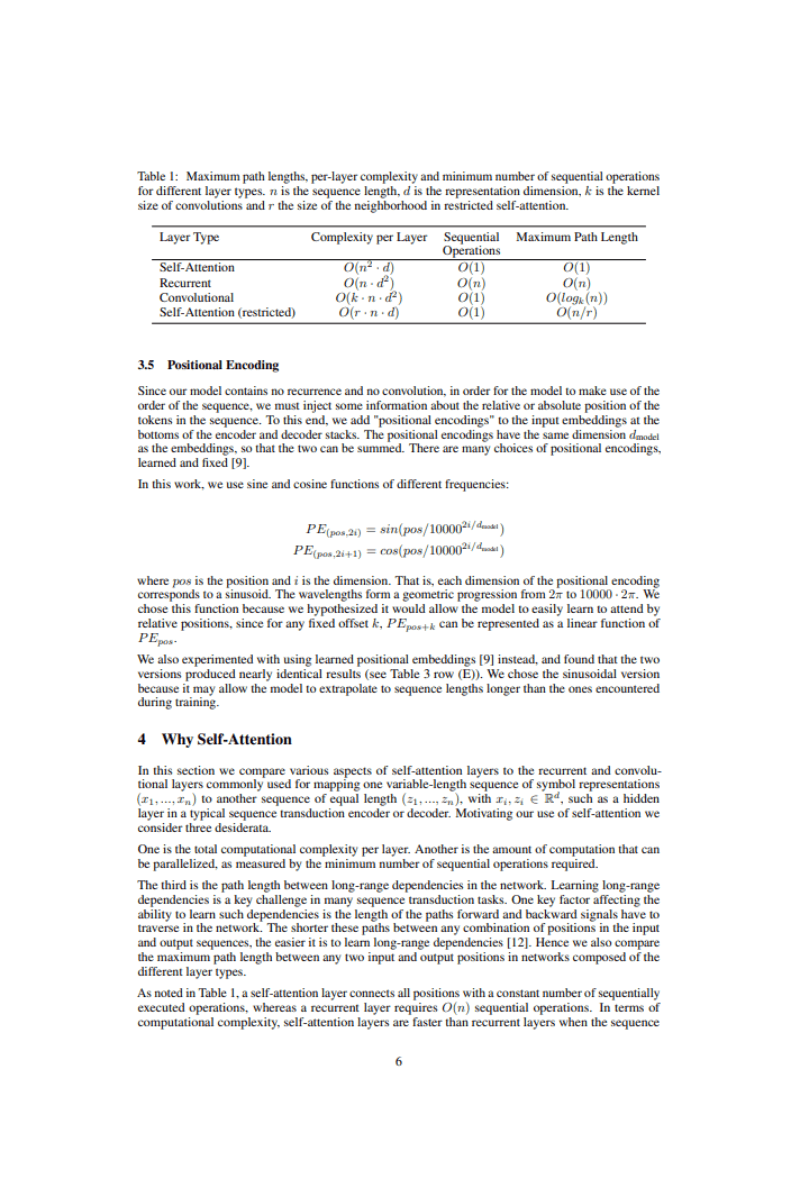
Get editable text to paste anywhere
From: Alex Chen <alex.chen@research.edu>To: ML Reading Group <ml-group@research.edu>Subject: Quick comparison of layer complexitiesDate: Thu, Dec 19, 2025 10:32 AMHi everyone,
I was reading through "Attention Is All You Need" and wanted to share this comparison table:
Layer Type Complexity Sequential Ops Max Path Self-Attention O(n² · d) O(1) O(1) Recurrent O(n · d²) O(n) O(n) Convolutional O(k · n · d²) O(1) O(logₖ(n)) Self-Attention (restricted) O(r · n · d) O(1) O(n/r) The standout here is that self-attention achieves O(1) maximum path length - meaning any two positions can directly attend to each other.
Best,
Alex
Choose Your Plan
Start free and upgrade when you need more power. All plans include all document types and export formats.
Free
Perfect for occasional use. No account needed.
- 10 conversions per day
- Receipts, invoices, bank & credit card statements, paystubs, table images
- Scanned PDFs, text PDFs, multi-page PDFs, JPG, PNG, HEIC, WebP & more
- Export to Excel, CSV, Word, PDF, XML, JSON
- Privacy first: files & output are never stored
Free+
Free forever
Double your daily limit with a free account.
- 20 conversions per day
- Everything in Free
Premium
Billed monthly
For power users who need maximum conversions.
- Unlimited conversions
- Enhanced AI model for better accuracy
- Priority processing
- Priority email support
- Everything in Free+
Other Document Conversion Tools
Receipt to Excel
Convert receipt photos to organized spreadsheets for expense tracking
Bank Statement to Excel
Extract transactions from bank statements for financial analysis
Invoice to Excel
Digitize invoices and bills for accounts payable management
Credit Card Statement to Excel
Convert credit card statements for expense categorization
Paystub to Excel
Extract paystub, paycheck, and payslip earnings and deductions
Image Table to Word
Extract image tables to Word documents
PDF Table to Excel
Extract tables from PDF documents to Excel spreadsheets
Image Table to Excel
Convert scanned tables and whiteboard photos to Excel
Camera Image to Excel
Snap photos with your phone and convert to Excel instantly
Documents to JSON
Convert financial documents to JSON for data science and APIs
Documents to XML
Convert to XML for ERP systems and enterprise integration